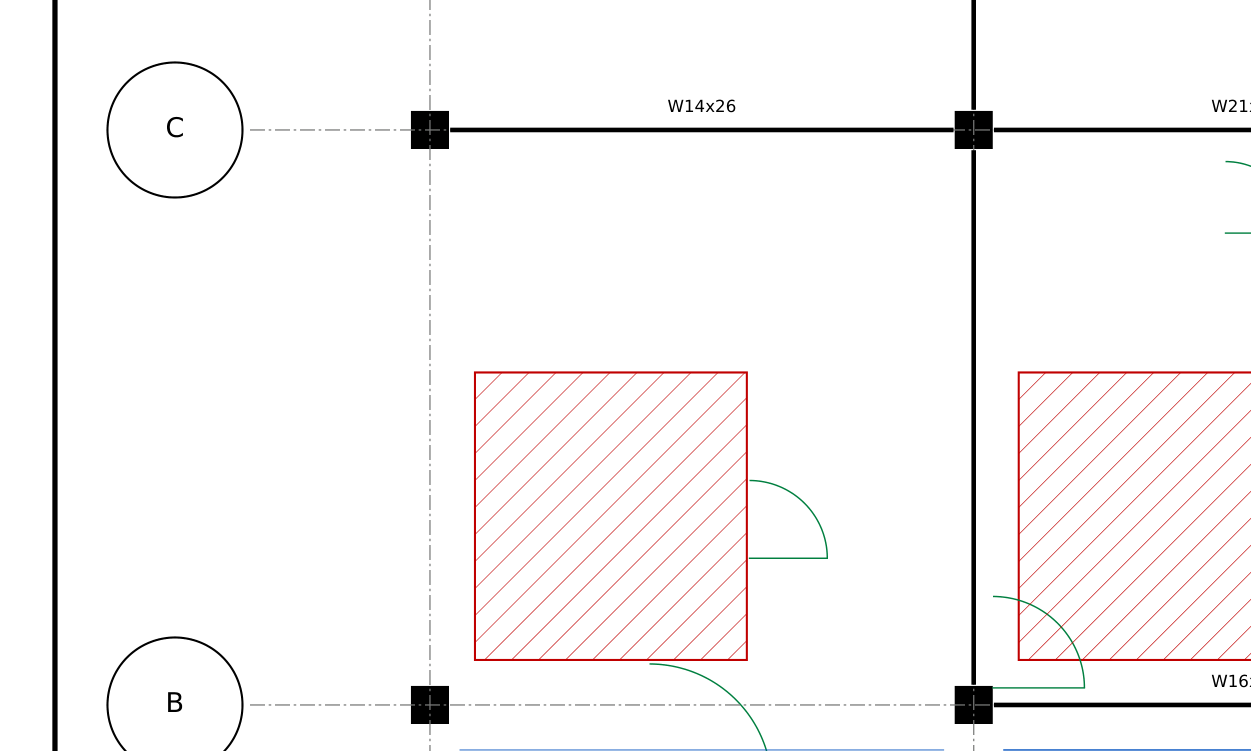
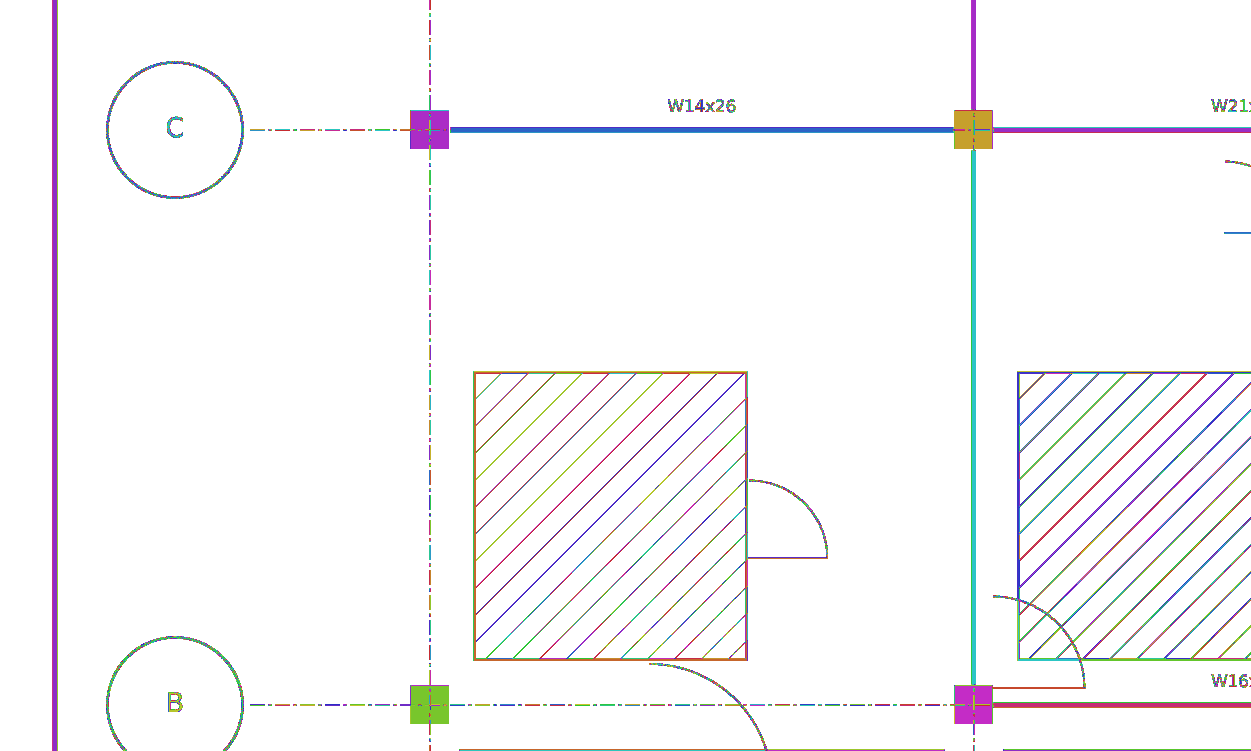
Which pixels belong together?
We read construction drawings. A PDF sheet is rendered to pixels, and before anything can recognise a line, a letter or a grid bubble, it needs one answer: which pixels belong together.
A job arrives as a whole set of sheets, and every sheet is read this way, again whenever a revision comes in. So this first step has to be fast, and exact.
"Together" means touching and exactly the same colour. Giving each such group its own number is called connected-component labelling. Textbooks do it on black-and-white images. Drawings are harder in three ways.
They are not black and white
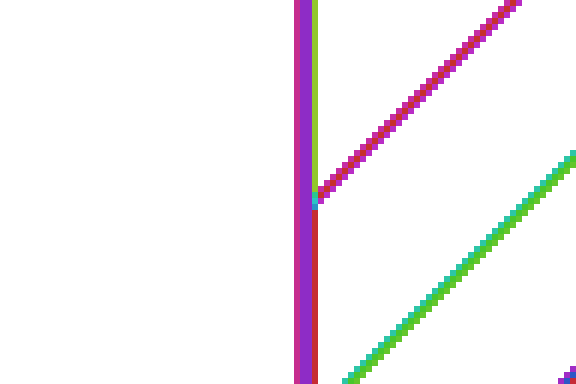
Anti-aliasing paints the edge of every line in in-between shades. Each shade is its own colour, and a pixel may only join a neighbour of exactly its colour.
Lines run diagonally
Two pixels that share only a corner should still count as touching, or every 45° line falls apart. So each pixel has eight neighbours, not four.
They are big
A 42 × 30-inch sheet at 800 dpi is 33,600 × 24,000 = 806 million pixels. We wanted the answer for that in well under a second.
What we are computing
Paint on the left. The right shows the answer we want: every pixel numbered so that two pixels share a number exactly when you can walk from one to the other, one neighbour at a time, without changing colour.
Both correct, both too slow
One colour at a time
The libraries everyone has (OpenCV, SciPy) label black-and-white images. So the obvious program loops: for each colour, make a black-and-white mask, label it, copy the result back. Every colour costs a full pass over the picture.
On the 800-dpi sheet that is colours × 806 million pixels: visits, where one pass would be 806 million.
Everyone at once, copying numbers
Ask every pixel just once instead: "does my neighbour have my colour?" A simple version: every pixel starts with its own position as its number, and in every round, all pixels at the same time take the smallest number among their same-coloured neighbours.
A number moves one pixel per round, so a long winding region needs as many rounds as it is long. A wall line across a sheet is tens of thousands of pixels long. We need joins that reach a whole region at once.
Point at a leader
Instead of copying numbers, every pixel stores one number: the pixel it points at, its parent. Follow the arrows and you reach a pixel that points at itself: the leader of the group.
Two pixels are in the same region when their arrows end at the same leader. To join two groups, change one arrow: point one group's leader at the other's. Everyone who reached the old leader now reaches the new one, however large the group. One more rule: the leader with the larger position points at the smaller one. The leader of a region is then always its first pixel in reading order.
This structure is called union-find (Galler and Fischer described it in 1964), and it is how almost every fast labeller works, on CPUs and GPUs alike. If you know it, skip to chapter 8.
Step through a 3 × 3 picture. The table is the entire memory: one number per pixel.
Start, Connect, Collapse, Number
Everything so far fits in four stages. They keep these colours for the rest of the post.
Collapse exists because after Connect some arrows still go the long way round (pixel 5 points at 2, which points at 0). After Collapse, finding a leader is one step. Number turns leader positions into small consecutive numbers.
What can run at the same time
Now give every pixel its own worker, all acting at once, in every stage. Inside a stage no worker needs another's permission: the order of the joins changes nothing, not even which pixel ends up leader. Between stages there is a wall: nobody starts the next stage until everyone has finished this one.
Each wall has a reason. Connect follows other pixels' arrows, so every arrow must exist first. Collapse records leaders, so no leader may still change. Number needs every final leader.
Two workers, one leader
Inside Connect, two workers can re-point the same leader at the same moment. With an ordinary write, one join silently disappears.
The fix is one hardware instruction that reads, takes the minimum and writes as a single step, and reports what was there before. If that is not what you expected, someone beat you to it: look again and retry.
The same thing, in GPU words
A GPU is a machine built for exactly chapter 6: thousands of workers running the same small program. Everything has a name already.
Threads are launched in teams. We choose teams of 32 × 8 threads covering a 32 × 8 tile of pixels. Inside a team, threads execute in fixed groups of 32 (a warp). Because a team is 32 wide, every warp is 32 neighbouring pixels of one row. Chapter 8 depends on that.
The join from chapter 4, with the retry from chapter 6, is the whole of the hard part. This is the code that runs, without path halving (chapter 8 adds it):
unite(a, b)Making it fast
The four stages above are correct. On the 800-dpi sheet the first three take on an M5 Pro and on an RTX 3070. Most of that time is spent on one region: the white paper.
Paper is about 95% of a drawing and one single region. Every paper pixel joins its neighbours, and all of those joins fight over the same leader. Each idea below removes some of that fight. Each is a switch, measured on its own at the end.
None of these ideas is new on its own. Union-find labelling on GPUs goes back to Oliveira and Lotufo (2010), Komura (2015, union-find with atomic operations) and Playne and Hawick (2018); finding runs with a warp vote is close to Hennequin, Lacassagne and colleagues' HA4 (2018); skipping neighbours another pixel already covers is Wu, Otoo and Suzuki's scan mask (2009); and joining the row above first is the order NVIDIA's cuCIM uses. Allegretti, Bolelli and Grana's block-based kernels and their YACCLAB benchmark (2019–2020) are the state of the art for black-and-white images. What we needed, and did not find ready-made, was all of it at once on exact colours, numbered deterministically in reading order, on both NVIDIA and Apple GPUs. The references are at the end of the post.
First, the order of the joins Connect
Each pixel joins up to four earlier neighbours: up-left, up, up-right and left. The order cannot change the answer. On an NVIDIA GPU it changed the time tenfold. Join the left neighbour first, and all 32 threads of a warp join their left neighbours at the same moment, while each of those still leads only itself: a row becomes one long chain, and every later search for a leader walks it. Join the row above first, and a pixel attaches to a row that is mostly joined already. It is the order cuCIM uses; we learned it by profiling cuCIM.
We counted it on an RTX 3070 at 600 dpi: following arrows took 186 steps per pixel with the left neighbour first and 35 with the row above first, and the join stage without any idea below went from 1.40 s to 0.135 s. With every idea below switched on, the first two stages are still about 20% faster there. On the M5 Pro the order made no measurable difference to the full labeller, and the plain stages got slower. Everything in this post joins the row above first.
1 · Let the warp find the runs Start
Along a row, colours come in runs. In Start, each of a warp's 32 threads answers one question: does a run start at me? (Is my left neighbour a different colour?) One instruction, a vote (__ballot_sync, simd_ballot), gives every thread all 32 answers as the bits of one number. Each thread finds the nearest 1 at or left of its own bit: the first pixel of its run. It points there.
Runs are now joined before Connect starts, with no memory traffic. In Connect, threads 1 to 31 skip the join to their left: their left neighbour is in their run. Only thread 0 joins left, to the previous warp. Nothing is written down to remember this; each thread knows its position in the warp.
2 · Skip joins someone else makes Connect
A pixel checks four earlier neighbours. If its left neighbour has its colour, they are one group already, and the left neighbour has already joined everything above them both, except possibly up-right.
At most one join per same-coloured run above. On the 800-dpi sheet this alone cuts 3.2 billion joins to 0.8 billion.
3 · Shorten arrows while walking Connect
Finding a leader means following arrows, and chains can grow long. While walking, point each pixel you pass at its grandparent. The next walk takes half the steps. It is safe with other threads around because the write is the same atomic minimum: it only ever moves an arrow closer to the leader.
4 · Ignore the paper Start
Nobody downstream wants the paper region. If the caller names a colour to ignore, its pixels get label 0 in Start and take part in nothing after. Joins on the 800-dpi sheet drop from 3.2 billion to 65 million.
5 · Number without a giant list Number
After Collapse, leaders are identified by their position, up to 806 million. A leader's final number is 1 + how many leaders come before it.
Watch it run
Here are all four stages on a drawing small enough to see, with the switches from this chapter. Each step is one thread running the real kernel on the right, and the highlighted line is where that thread is. Connect plays its threads in a shuffled order: on the GPU any order can happen, and the answer must not depend on it.
kernels.cu and kernels.metal when this page is built. Warps here are 8 lanes wide so that runs fit the picture (32 on the GPU), and path halving is left out so the arrows stay readable. Switch runs and skip off to see the joins they save.What each idea is worth
On the M5 Pro, runs remove only of the joins but of the time: they remove exactly the joins that fought over the paper's leader. On the RTX 3070 they remove only of the time, because joining the row above first has already removed most of that fight there. And together the three ideas remove of the joins. They only pay off together: on the RTX 3070, skipping joins on its own is slower than the plain kernel.
From 50 to 800 dpi
The same synthetic sheet, rendered at seven resolutions, labelled with all four stages and every switch above. The reference is cc3d, the fastest CPU library we know for this job; our labels match its labels value for value at every point on these charts. Every timing comes from this one image, which is mostly paper; a picture with less background will behave differently.
At 800 dpi, with the picture already on the GPU, the M5 Pro labels the sheet in , faster than cc3d on the same machine; one call per colour would take about . The RTX 3070 takes , and a rented A100 . Counting the copies, the picture onto the GPU and the labels back, one call takes ; Fig. 20 shows where that time goes. Our memory is the labels themselves, 4 bytes per pixel, plus 16 KB of counts per million pixels.
On the RTX 3070 most of a call is copying: the picture crosses PCIe to the card and the labels come back. The labelling is the coloured part. The rented A100 is no different: it labels the 800-dpi sheet in , and the copies take times that. The M5 Pro's GPU shares memory with its CPU, and the copies are a much smaller share.
Against NVIDIA's libraries
NVIDIA ships two functions that label an image of many values in one call with 8 neighbours: nppiLabelMarkersUF in NPP, its image-processing library that comes with CUDA, and label in RAPIDS cuCIM. (CV-CUDA's label joins only 4 neighbours, which splits every diagonal line, so it cannot label a drawing.) We ran them on the same renders, on the RTX 3070 and on a rented A100 with 40 GB, next to ours.
cuCIM gives the same regions as ours at every size, and it is slower: . The gap is largest on small images, where cuCIM's fixed cost per call dominates, and smallest on the full sheet. The memory for the answer is the same, 4 bytes of label per pixel; no labeller can use less. The difference is the input. cuCIM labels one number per pixel, so a colour picture must first be packed into a 32-bit copy: 4 more bytes per pixel, and a step that is not in its times above. Ours reads the RGB picture as it is. NPP's labels did not match cc3d at any resolution we ran it on, and it was 2.5–24× slower than ours on the RTX 3070, the gap growing with the image, in twice the memory. At 800 dpi its buffer-size query returns −1,069,367,288 bytes, the right size wrapped to 32 bits (with compression, already at 600 dpi); we did not size the buffer by hand.
label is a general, scikit-image-compatible labeller for integer images of any dimension; NPP covers hundreds of image functions across every NVIDIA GPU; cc3d labels 2-D and 3-D images in many connectivities on any CPU, and it is the reference that told us whenever we were wrong. Ours does one job: 2-D colour pictures with diagonal neighbours. A kernel built for one job beating general tools on that job is expected, not a verdict on them, and much of our speed came from their ideas (chapter 8, and the references at the end).NVIDIA's labeller splits regions
On our drawings NPP returned more regions than exist. Before calling a vendor library wrong, we ran it on NVIDIA's own five sample images, called the way NVIDIA's own sample program calls it, and compared it with two labellers that agree with each other to the byte: cc3d and ours.
It splits regions. Move over any picture below: where NPP is right its picture matches cc3d's, and every piece it cut off a region shows up in a strong colour of its own.
| NVIDIA sample image | cc3d | ours | NVIDIA's committed output, NPP 12.0.0 | NVIDIA's sample program, NPP 12.4.1, RTX 4060 Ti, one run | NPP 13.2.0, RTX 3070, 30 runs |
|---|---|---|---|---|---|
| teapot | 155,343 | 155,343 | 155,333 | 155,343 | 155,343 every run |
| PCB_METAL | 3,732 | 3,732 | 3,732 | 3,732 | 3,732–3,735; wrong in 28 |
| CT_skull | 407 | 407 | 415 | 437 | 431–439; wrong in 30 |
| PCB2 | 1,202 | 1,202 | 1,225 | 1,272 | 1,270–1,277; wrong in 30 |
| PCB | 1,436 | 1,436 | 1,441 | 1,464 | 1,473–1,481; wrong in 30 |
8 neighbours throughout. cc3d and our kernel give identical label files on all five images. NPP's count changes from run to run. With 12.4.1 and later it is never below the truth, because those versions only cut regions; NPP 12.0.0 (NVIDIA's own files) and 11.8 also join regions across row ends, which is how the teapot comes out with too few labels. NVIDIA's committed files are judged by our checker.
It is not how we call it. NVIDIA's sample program for this function, built unmodified against NPP 12.4.1, writes wrong labels on three or four of its own five images, depending on the run. NVIDIA's samples repository even includes the files that program wrote in NVIDIA's own run, with NPP 12.0.0: four of the five are wrong.
It is not new, either. Two NVIDIA forum threads from 2021 report regions split by this function, and the CUDA 11.5 release notes list a fix for incorrect results from it. We see it in every version we tried, 11.8.0 to 13.2.0, on whichever of an RTX 3070, an RTX 4060 Ti and an A100 it ran on.
nppiLabelMarkersUF, check its labels.Same answer, value for value
Because a region's leader is its first pixel in reading order, numbering leaders in order gives exactly the labels cc3d and OpenCV produce, not just the same grouping. So every test compares the full label image:
- Tests on random images, adversarial shapes, both neighbourhoods, every combination of switches, CUDA and Metal.
- Every benchmark point in this post was checked against cc3d at full size, paper labelled and ignored.
- One source of truth for the algorithm: the CUDA and Metal kernels are line-for-line the same.
What we have not done: run on Hopper or Blackwell GPUs, or on images of more than 231 pixels (about 1,300 dpi on this sheet). The test sheet is synthetic, drawn to look like a framing plan, because our customers' drawings are theirs to share, not ours.
One call
The labeller is open source (MIT), with the benchmark scripts and the raw results behind every number in this post: https://github.com/Acero-AI/colorcc.
Underneath, both GPUs run the same Python. One function launches the five kernels in order on one queue, with a prefix sum in the middle of Number; only the last step differs, how a kernel is compiled and started. On an NVIDIA GPU, NVRTC compiles the CUDA source for whatever card it finds, the first time you call it; on a Mac, PyTorch compiles the Metal source. Nothing is built when you install it.
_stages in colorcc/__init__.py: the same on both GPUs_cuda_metalrun(name, threads, group, *buffers) is the only thing the two GPUs do differently.Credits and references
Every idea in this labeller came from someone else's paper or code; our part was fitting them together for exact colours on two kinds of GPU. cc3d, by William Silversmith, was our reference for every label in this post. Profiling RAPIDS cuCIM taught us the join order in chapter 8. CuPy compiles our CUDA kernels and PyTorch our Metal ones.
- B. A. Galler and M. J. Fischer. An improved equivalence algorithm. Communications of the ACM 7(5): 301–303, 1964. (union-find)
- R. E. Tarjan and J. van Leeuwen. Worst-case analysis of set union algorithms. Journal of the ACM 31(2): 245–281, 1984. doi:10.1145/62.2160 (path halving, analysed)
- K. Wu, E. Otoo and K. Suzuki. Optimizing two-pass connected-component labeling algorithms. Pattern Analysis and Applications 12: 117–135, 2009. doi:10.1007/s10044-008-0109-y (the scan mask behind skipping joins)
- V. M. A. Oliveira and R. A. Lotufo. A study on connected components labeling algorithms using GPUs. SIBGRAPI 2010.
- Y. Komura. GPU-based cluster-labeling algorithm without the use of conventional iteration: application to the Swendsen–Wang multi-cluster spin flip algorithm. Computer Physics Communications 194: 54–58, 2015. (union-find with atomics on GPUs)
- D. P. Playne and K. Hawick. A new algorithm for parallel connected-component labelling on GPUs. IEEE Transactions on Parallel and Distributed Systems 29(6): 1217–1230, 2018.
- A. Hennequin, L. Lacassagne, L. Cabaret and Q. Meunier. A new direct connected component labeling and analysis algorithms for GPUs. DASIP 2018, 76–81. (HA4: runs found within a warp)
- S. Allegretti, F. Bolelli and C. Grana. Optimized block-based algorithms to label connected components on GPUs. IEEE Transactions on Parallel and Distributed Systems 31(2): 423–438, 2020. doi:10.1109/TPDS.2019.2934683
- C. Grana, F. Bolelli, L. Baraldi and R. Vezzani. YACCLAB: Yet Another Connected Components Labeling Benchmark. ICPR 2016, 3109–3114. doi:10.1109/ICPR.2016.7900112
- W. Silversmith. cc3d (connected-components-3d). github.com/seung-lab/connected-components-3d
- NVIDIA. RAPIDS cuCIM. github.com/rapidsai/cucim
- NVIDIA. NPP, the NVIDIA Performance Primitives. developer.nvidia.com/npp
- CuPy (cupy.dev), PyTorch (pytorch.org), OpenCV (opencv.org) and SciPy (scipy.org).
What comes next
Labelling is the first step of reading a drawing; everything after it, from lines and letters to grid bubbles and beams, starts from these regions. If others hit the NPP problem too, or NVIDIA replies, we will write about it here. To hear about it, follow the feed or the blog.